Rights: own account
WhereWorkspace settings › Roles & rights › Role › Rights › Own accountRightsettings.roles
Why these rights are different
Every other right says what someone may do in this workspace. The three account rights say what someone may do with their account outside this workspace: start a second workspace, keep content outside every workspace, join someone else's workspace. These are the exits from a workspace. A company that manages its workforce through the e-mail domain in a domain workspace can govern these exits; a manual workspace cannot, because it owns nobody's account.
Hence: the three rights are evaluated only in the domain workspace that Skillties has claimed and whose domain matches the person's address. There, the person's role decides. All rights add up as usual. For people with a private address, without a domain workspace or after leaving, there is no limit.


Create a new workspace
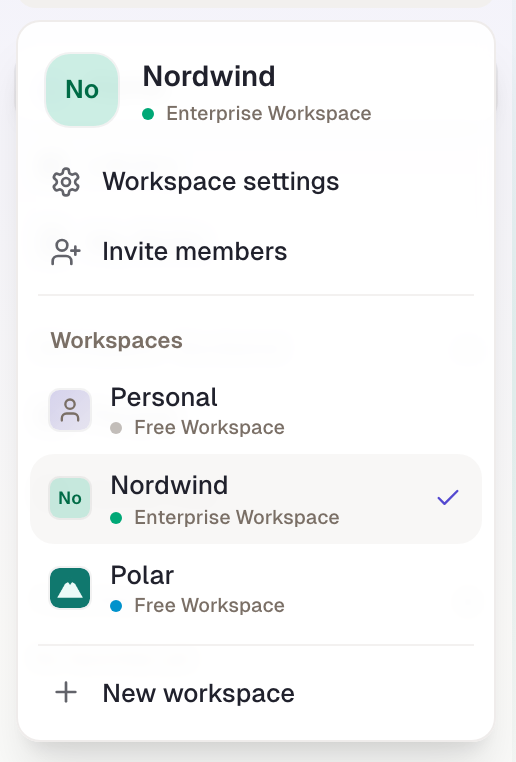
self.createWorkspace. The person may start another workspace, via New workspace in the workspace switcher. That is not the personal area.
- Without the right. The entry is missing from the switcher. A direct call is refused, without a hint as to why.
- Only works if. The person is a member of the domain workspace of their address, active or disabled. After leaving, no limit applies any more.
- Default. Member has it, Admin too. A workspace that wants to avoid sprawl unticks it on Member and gives it to a role, say an assistant role.
- Codetermination. Not as an extension, but as a withdrawal: under Codetermination the workspace can decide that taking this right away needs a request. The preselection does not include it.
Use the personal area
self.personalArea. The person uses their account without an active workspace: Personal in the workspace switcher, with their own skills and profiles outside every workspace.
- Without the right. The Personal entry is missing. Whoever still had it active through a saved setting lands in the first workspace on the next load; the switch is also refused on the server.
- Only works if. As above: membership in the domain workspace of the address.
- Default. Member and Admin.
- Codetermination. The withdrawal can be made subject to approval; the preselection is empty.
Accept invitations from other workspaces
self.acceptWorkspaceInvite. The person may follow an invitation into someone else's workspace.
- Without the right. The invitation stays open. On the invitation page the person reads that joining is not released for their account and which company governs that. Whoever invited is not told why; on their side the invitation remains open.
- Only works if. The person is already a member of a domain workspace. Joining through one's own e-mail domain is not affected, nor are invitations into one's own domain workspace.
- Default. Member and Admin.
- Codetermination. Withdrawal can be governed; the preselection is empty.
What the rights do not do
They do not revoke an existing membership. Whoever is already in a second workspace stays there, even if the domain workspace unticks accepting invitations. Nor do they hide content: a personal area that already holds content keeps it; only the access through the switcher is gone until the right returns.
Overview
| Right | Surface | Without a domain workspace | Default Member |
|---|---|---|---|
| Create a new workspace | “New workspace” entry in the switcher | always allowed | yes |
| Use the personal area | “Personal” entry in the switcher | always allowed | yes |
| Accept invitations from other workspaces | invitation page | always allowed | yes |
Example
Nordwind is the domain workspace for all addresses on nordwind.example. Management wants employees neither to start their own workspaces nor to join foreign ones; the personal area is to stay. Robert unticks “Create a new workspace” and “Accept invitations from other workspaces” on Member. Because codetermination at Nordwind does not list these two rights as a withdrawal needing approval, it applies immediately. For Paul, New workspace is missing from the switcher; Personal is still there. When a supplier invites Clara into its workspace, she reads on the invitation page that Nordwind has not released joining. Robert creates the role “Partner access” for sales, which carries only “Accept invitations from other workspaces”, and assigns it to Clara. Robert opens the same role in his manual workspace Boreal: there the three ticks are locked, since Boreal is nobody's domain workspace.
Checked with version 0.6.0 · 21 Oct 2026